Which Claude when: the model picker, explained.
That model name at the top of Claude is a menu, not decoration. Pick the wrong one and you burn through your plan for no reason. Here's the simple rule.
Liked this? New guides land here first. No spam, ever.
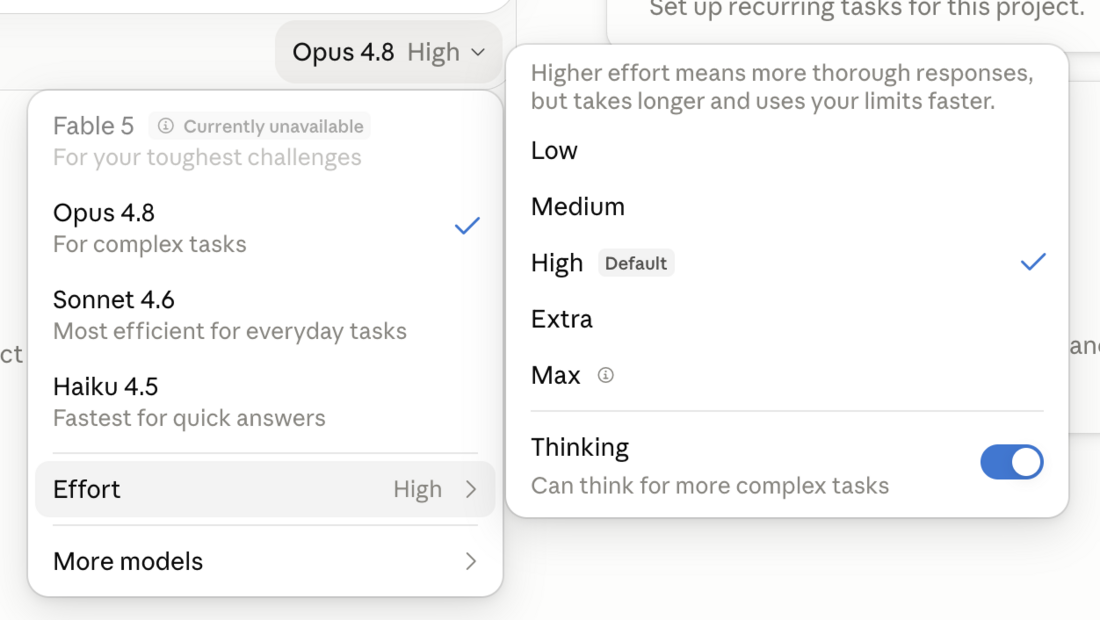
Claude comes in more than one model. A powerful one for hard thinking, a faster, lighter one for everyday jobs. Running every tiny task on the most powerful model chews through your plan's limits for no extra benefit. The rule: big-brain task, powerful model. Quick and simple, everyday model. You can switch anytime, even mid-chat.
There's more than one Claude.
That model name at the top of the screen looks like a label. Tap it and it's a menu. Inside, you'll see a few versions of Claude, each tuned for a different kind of work. One is built to think hard. One is built to move fast. The names and version numbers change every few months, so don't get attached to those. The idea underneath stays the same.
The powerful one.
Reach for the powerful model when the task is genuinely hard. Strategy. Deep analysis. Working through a tricky problem. Anything where you want Claude to slow down and think before it answers. It's slower and it uses more of your plan, and for the right job that trade is completely worth it. This is the model you want when the answer actually matters.
[On the powerful model:] Think this through properly before you answer. I'm deciding [your real decision]. Lay out the trade-offs, the risks I might be missing, and what you'd do in my position and why.
The everyday one.
The everyday model is faster, lighter, and much easier on your usage limit. It's perfect for the bread-and-butter stuff: quick rewrites, simple questions, tidying up text, drafting a message, summarising something short. For most of what you do in a day, you will not notice any drop in quality. You'll just notice you're getting answers quicker and lasting longer on your plan.
[On the everyday model:] Tidy this up so it's clearer and warmer, same length, same meaning: [paste your text]. Don't make it formal, just make it read better.
Why it matters for your plan.
On the free and lower-tier plans you've got limits on how much you can use. Running every small task on the most powerful model burns through those limits far faster, often for an answer the everyday model would have nailed in half the time. Matching the model to the job is the single easiest way to make your plan stretch further without paying a cent more.
Here's a task: [describe what you want to do]. Tell me honestly whether this needs your most powerful model or whether the faster everyday one would handle it just as well, and why.
The simple rule.
Here's the whole thing in one line. Big-brain task? Powerful model. Quick and simple? Everyday model. That's it. And you're not locked in, you can tap the model name and switch anytime, even partway through a conversation. Start a deep strategy chat on the powerful model, then drop to the everyday one when you're just polishing wording. No need to start over.
Not sure? Default to the everyday model. It handles most things beautifully, and you save the powerhouse for when you genuinely need deep thinking. And ignore the version numbers entirely. The exact names change every few months. The only thing worth remembering is the idea: one for thinking hard, one for moving fast.
One last thing.
People treat the model picker like a setting they're not qualified to touch. It's the opposite. It's the one lever that directly controls how long your plan lasts, and it takes one tap to pull. Use the powerful model when the stakes are real. Use the everyday one for everything else.
Match the model to the job, and the same plan suddenly goes a lot further.